PAST LIVES
A Memorial Experience Designed for the Living.
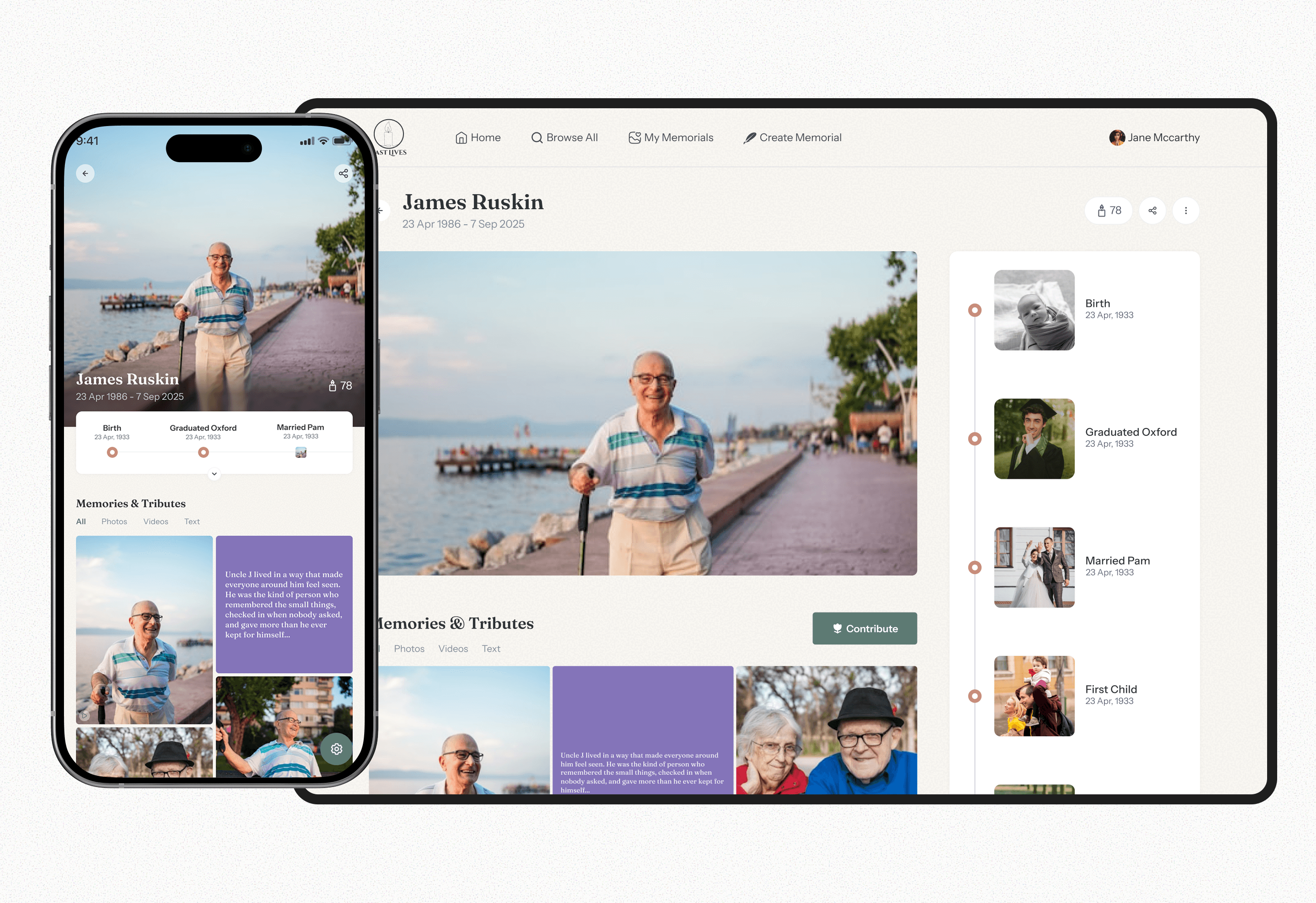
The Past Lives project was about building a sanctuary, a digital archive of someone’s entire existence, created by people who are grieving, remembering, healing, or celebrating a life well lived.
Year
2025
Industry
Social/Wellness
Client
Past Lives
Project Duration
2 weeks
UNDERSTANDING THE Problem
Today, memories are scattered everywhere. Old Facebook pictures. WhatsApp images. Non-digital photo books. Google Photos. Snapshots from 2016 no one can find again.
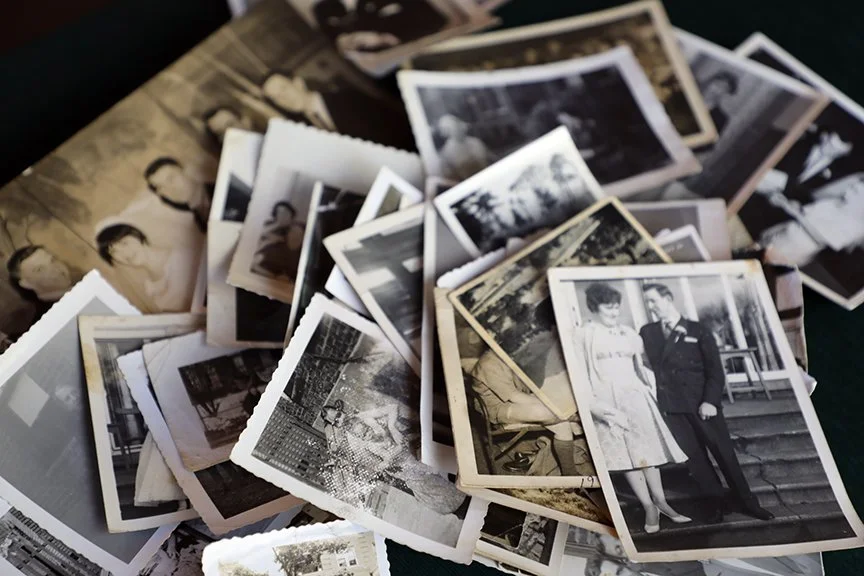
When someone passes, families have to scramble through this fragmentation, trying to build a tribute from pieces spread across the internet or in most cases - their basement.
The client wanted a solution that fixes exactly that.
THE GOAL
To create a permanent, centralized digital archive where loved ones can share memories, stories, photos, and key life moments in a peaceful, dignified environment.
THE Challenge
Existing memorial platforms often feel dark, old-fashioned, or emotionally heavy. We needed the exact opposite.
Life-first, not death-first.
TARGET USERS
Primary: The Creator
Often, the spouse, sibling, or child of the deceased.
Tech literacy level: Low to moderate.
Emotionally sensitive context requiring clarity, minimal friction, and calm visuals.
Secondary: The Mourner/Visitor
Friends and extended family who come to view the memorials
RESEARCH INSIGHTS
The short turnaround time of the project didn't allow for an extensive research process. However, I was able to interview individuals who had once lost a relative to understand how they process memories. Many described the experience this way:
“We had photos everywhere. Some on my phone, some on my siblings’ phones, some in old albums. I didn’t know how to bring them together.”
“Creating something online felt intimidating, but I wanted a place people could visit and remember.”
The following deduced insights heavily influenced the product direction:
People crave a sense of permanence but lack a structured place to store memories.
Many users rely on scattered WhatsApp groups, Google Drive folders, or old photo albums. They fear losing these memories over time and would love a single, safe, dedicated space.
Families want simplicity during emotionally heavy moments.
Users said existing memorial platforms feel “too complicated,” “too cold,” or “too much to set up.” They want something respectful, warm, and easy enough to complete in one sitting.
Photo selection and storytelling are the most emotionally meaningful parts.
People spend the most time choosing the portrait and writing the tribute. They want this moment to feel special, not rushed or transactional.
Grief makes decision-making slower, so the interface must reduce friction.
People dealing with loss said their energy and mental bandwidth were low. They didn’t want too many choices, too much text, or complex controls.
People crave a sense of permanence but lack a structured place to store memories.
Many users rely on scattered WhatsApp groups, Google Drive folders, or old photo albums. They fear losing these memories over time and would love a single, safe, dedicated space.
Families want simplicity during emotionally heavy moments.
Users said existing memorial platforms feel “too complicated,” “too cold,” or “too much to set up.” They want something respectful, warm, and easy enough to complete in one sitting.
Photo selection and storytelling are the most emotionally meaningful parts.
People spend the most time choosing the portrait and writing the tribute. They want this moment to feel special, not rushed or transactional.
Grief makes decision-making slower, so the interface must reduce friction.
People dealing with loss said their energy and mental bandwidth were low. They didn’t want too many choices, too much text, or complex controls.
People crave a sense of permanence but lack a structured place to store memories.
Many users rely on scattered WhatsApp groups, Google Drive folders, or old photo albums. They fear losing these memories over time and would love a single, safe, dedicated space.
Families want simplicity during emotionally heavy moments.
Users said existing memorial platforms feel “too complicated,” “too cold,” or “too much to set up.” They want something respectful, warm, and easy enough to complete in one sitting.
Photo selection and storytelling are the most emotionally meaningful parts.
People spend the most time choosing the portrait and writing the tribute. They want this moment to feel special, not rushed or transactional.
Grief makes decision-making slower, so the interface must reduce friction.
People dealing with loss said their energy and mental bandwidth were low. They didn’t want too many choices, too much text, or complex controls.
What these insights suggested for later design decisions
We would need to create a step-based setup that feels like a gentle guide, not a form.
The platform should reduce cognitive load with simple, safe defaults instead of too many options.
The interface would need to feel emotional and human, possibly using visual metaphors rather than cold UI patterns.
We should create a clean system that ensures memorial pages stay active, organized, and preserved long-term.
The system would likely need clear reassurance, pre-designed templates, and comforting microcopy to help users feel supported throughout the process.
Any interaction style we choose should respect the emotional state of someone grieving and avoid anything that looks too robotic, transactional, or “tech startup”.
USER FLOWS
The platform serves two journeys:
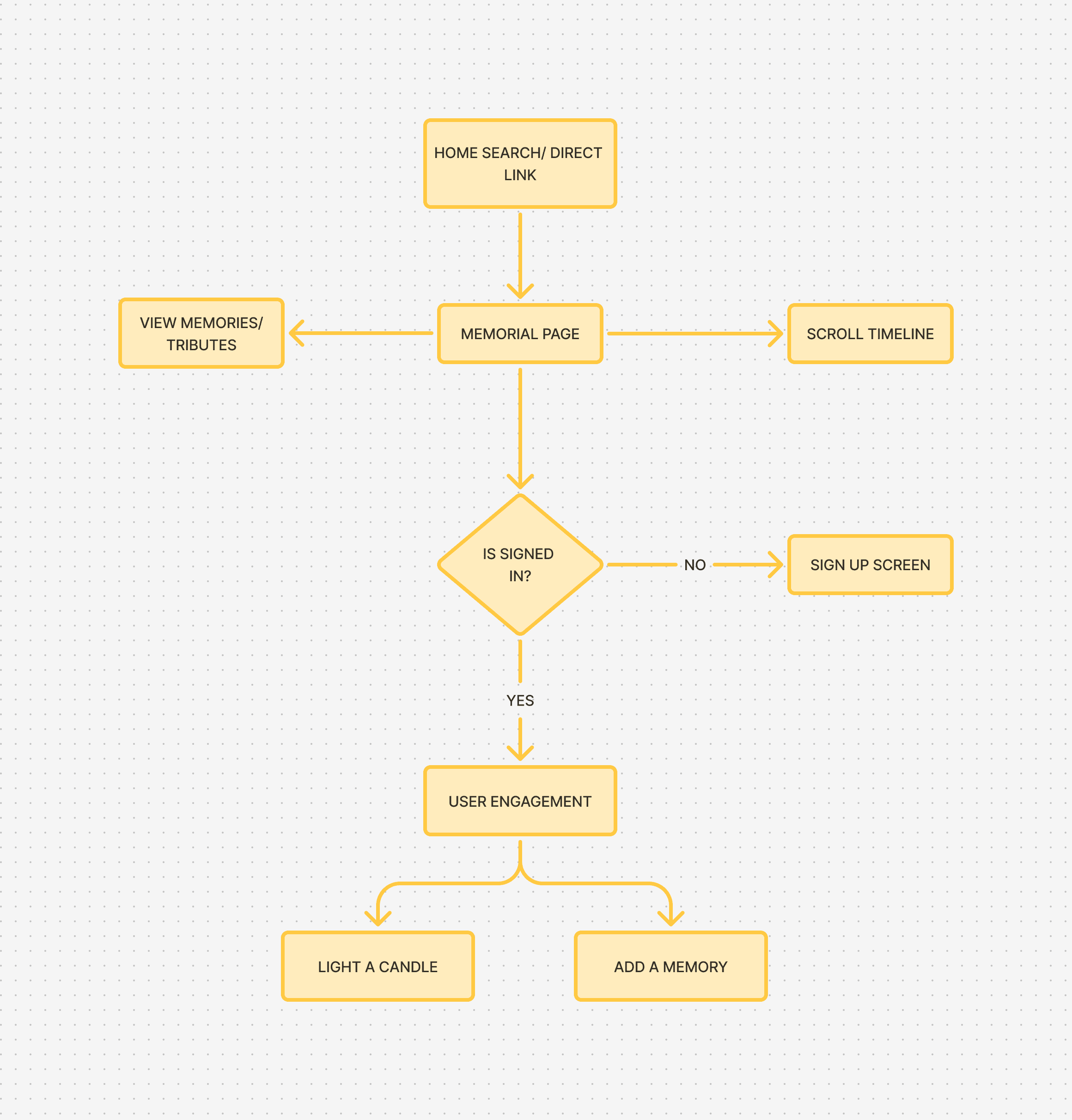
The Creator Journey
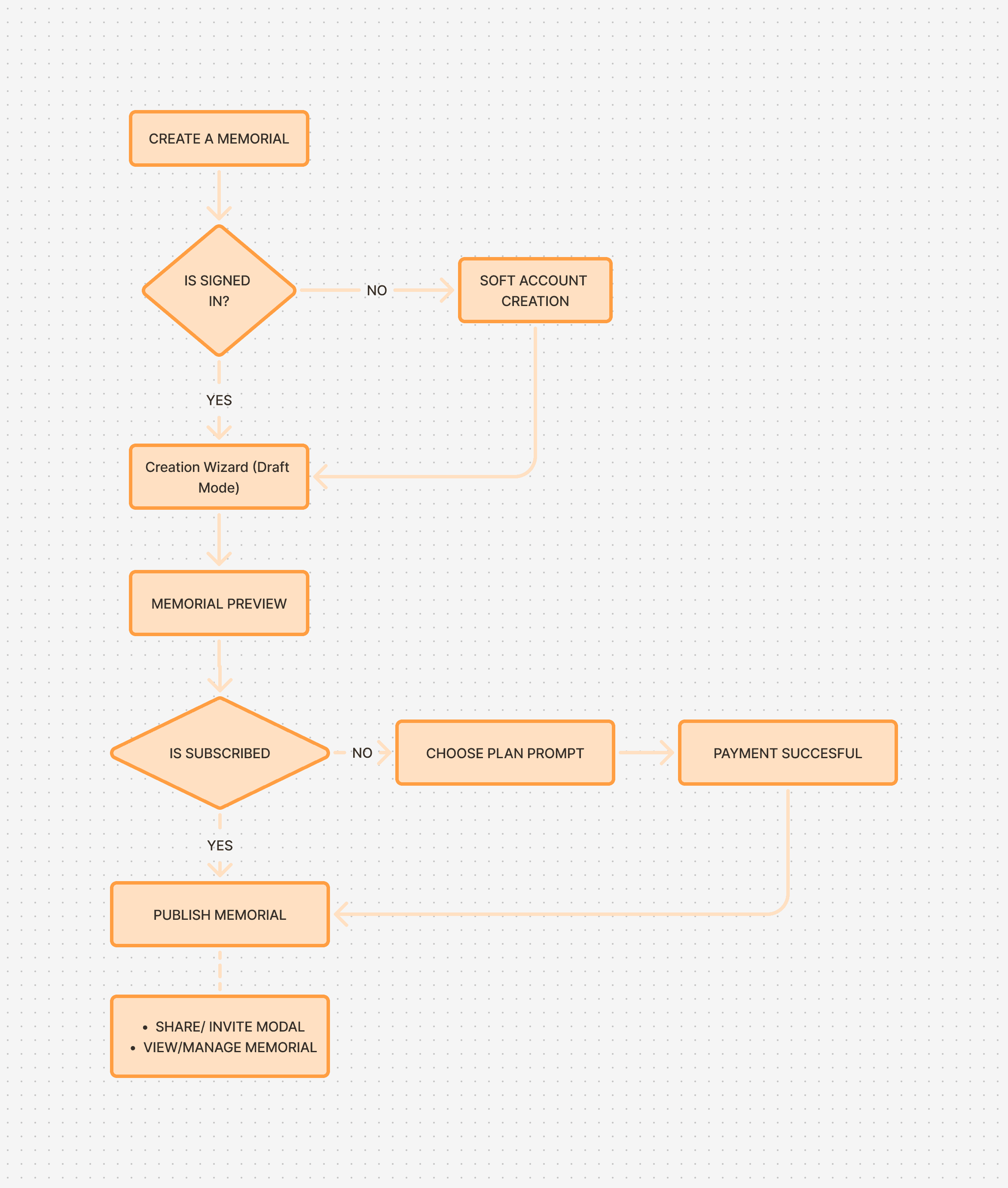
The Mourner Journey
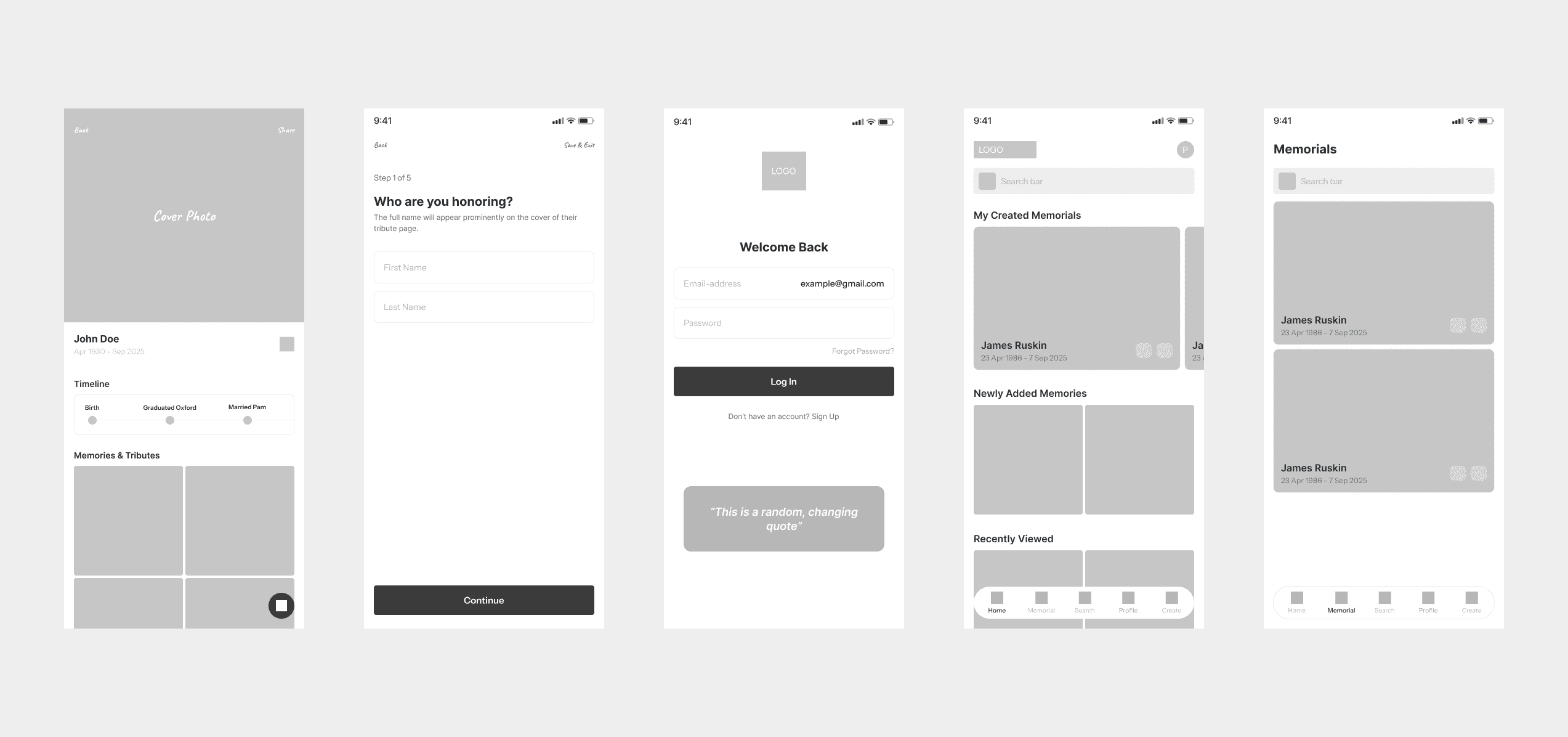
LOW FIDELITY WIREFRAMES
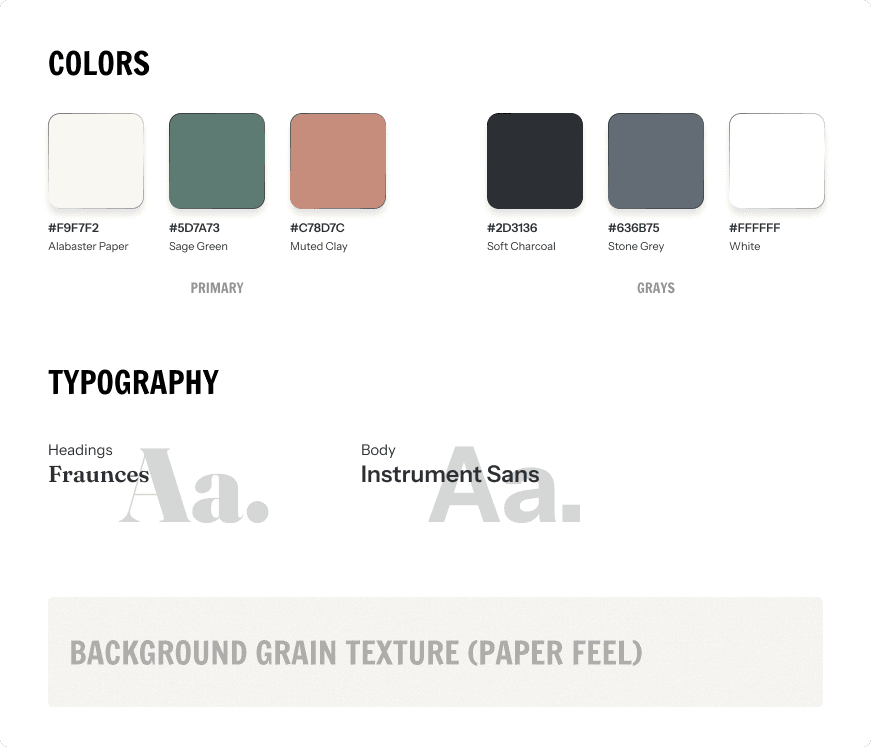
VISUAL IDENTITY
SPLASH SCREENS
The splash screen introduces users to the application. After going through the screens, they are prompted to select a path. Log In, Create a Memorial, Find a Memorial.
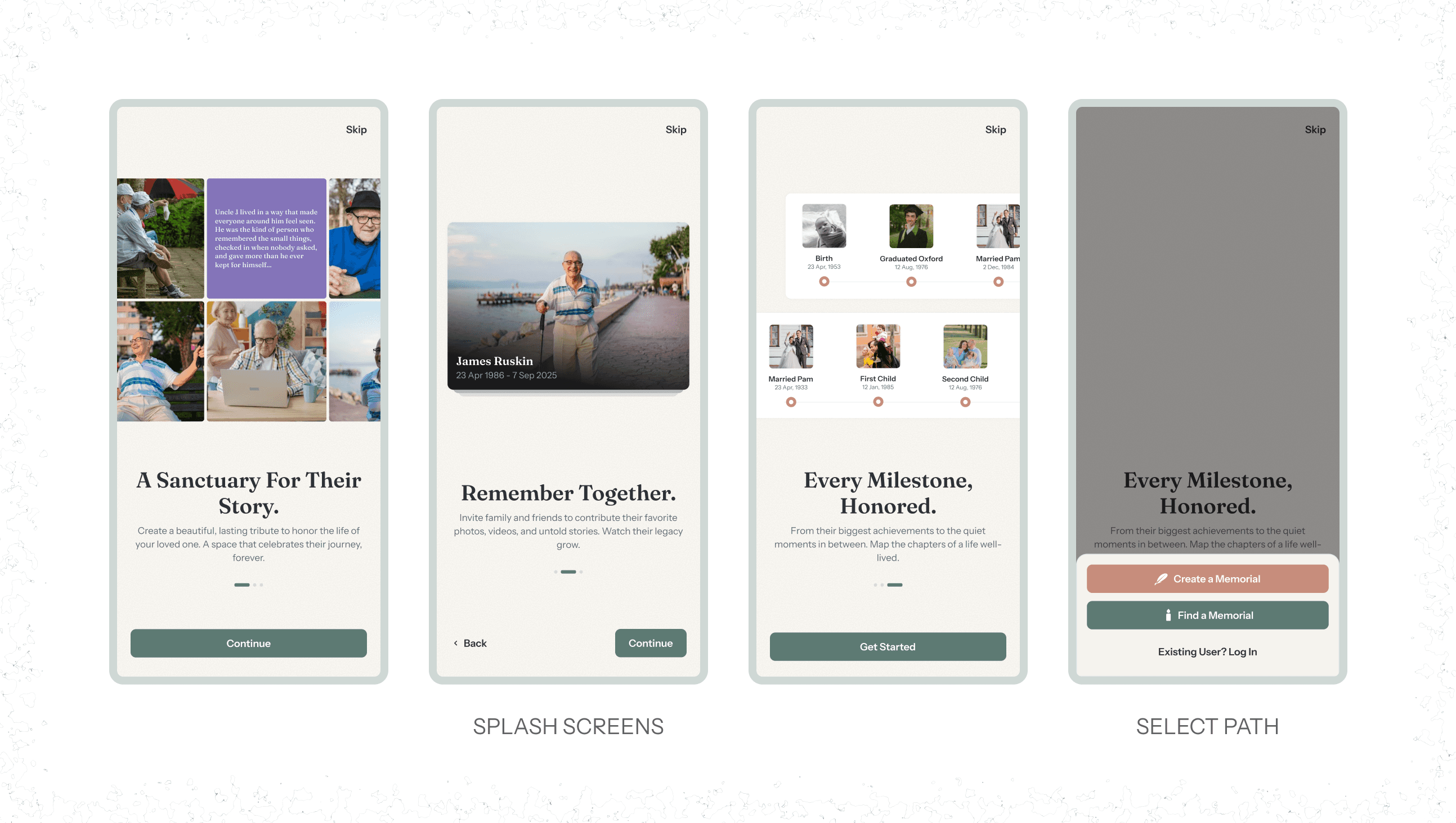
Users can browse through memorials without having to be a signed-in user; however, to perform certain actions, they are required to sign in to the app.
LOG IN SCREEN
We have
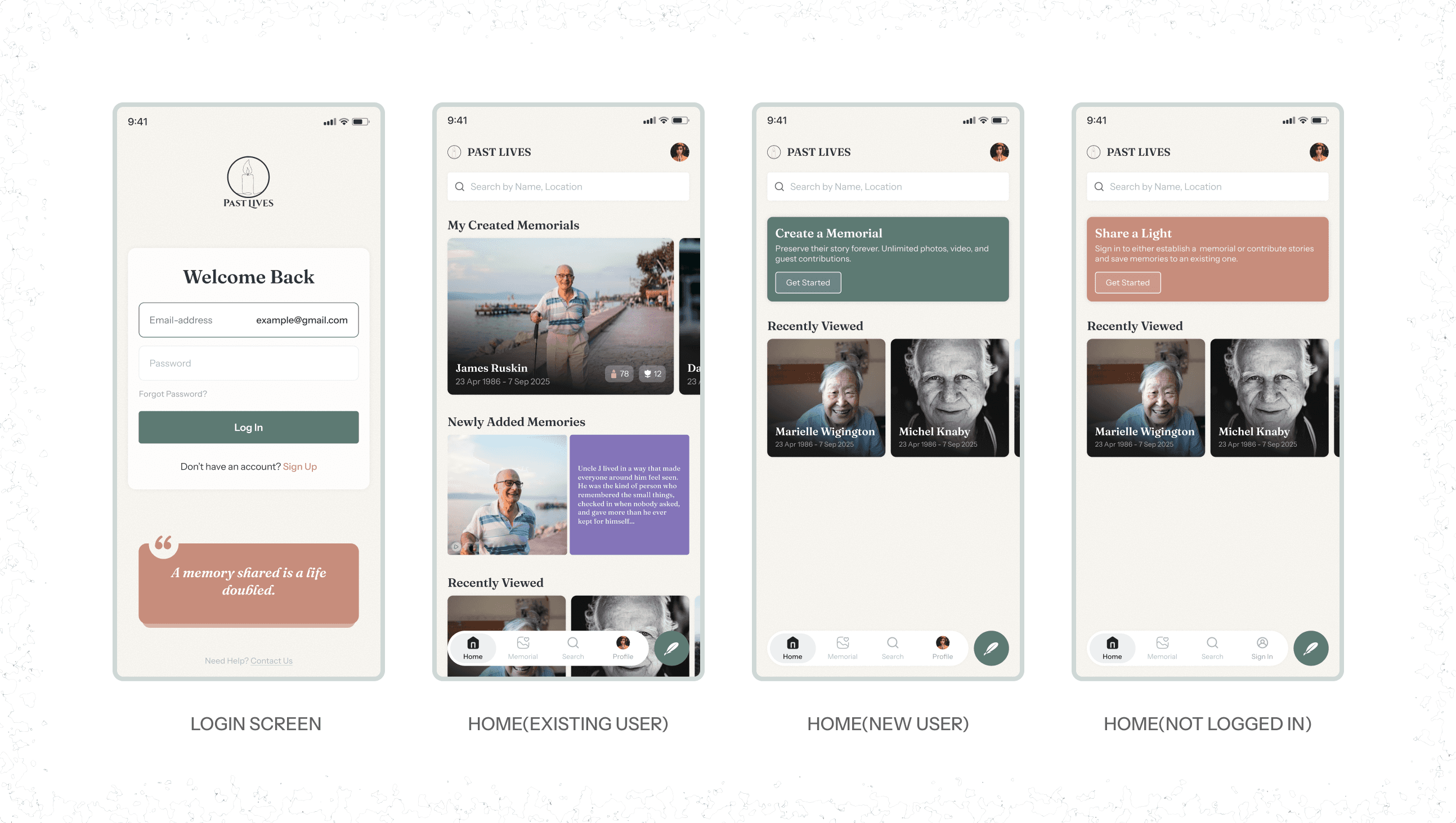
Login Screen: Added to the login form is a changing quote block that supports users.
Home Screen: We have 3 instances of this screen
Home(Existing User): Here, existing users can see a horizontal slideshow of memorials they have created, a list of newly added memories, and their recently viewed memorials.
Home(New User): A section that prompts them to create memorials
Home(Not Logged In): A section block with a CTA to sign in to the platform.
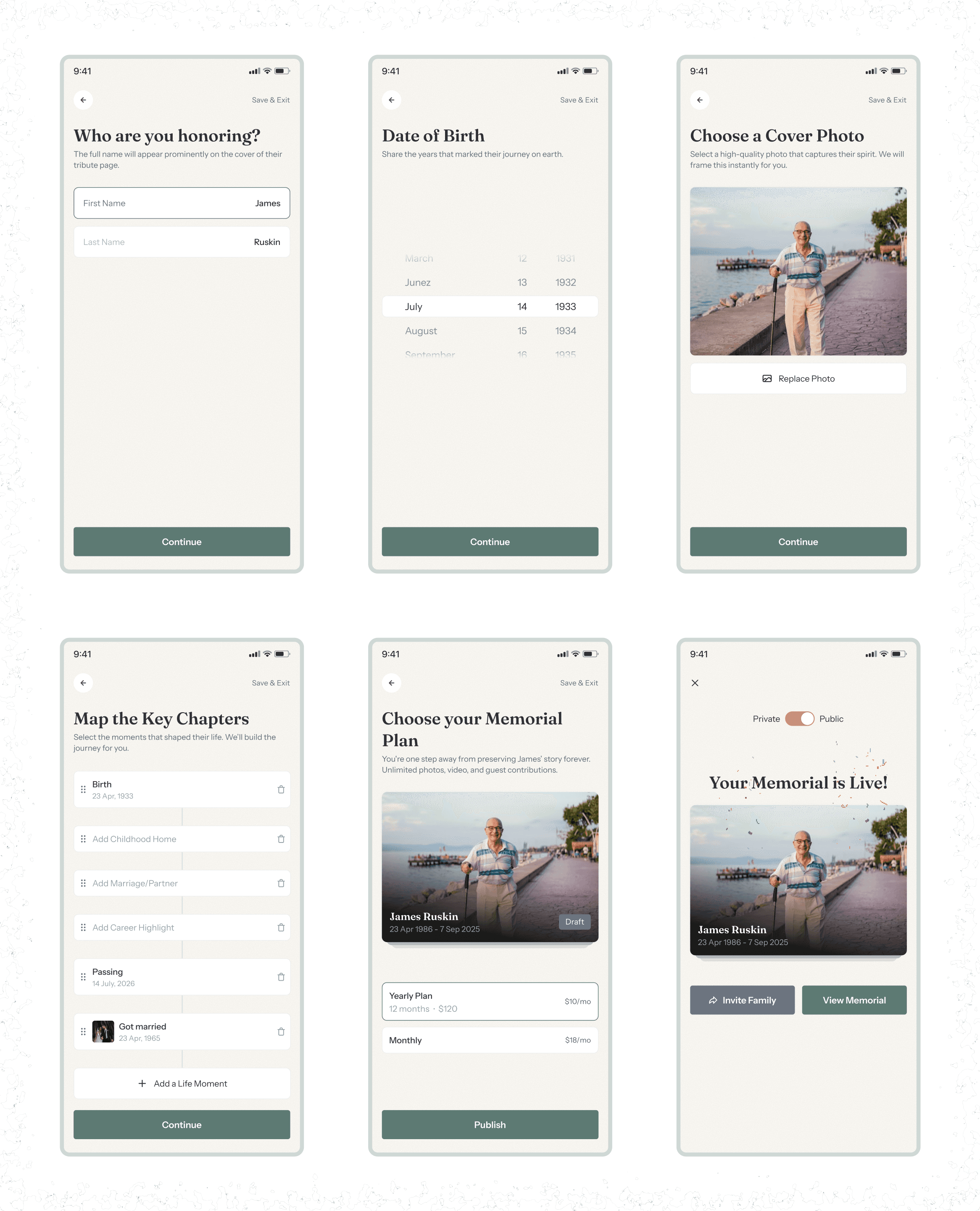
MEMORIAL CREATION WIZARD
The goal was to make this feel like writing a biography, not filling a form.
Rationale: Step-based setup that feels like a gentle guide. Pre-designed templates and comforting microcopy to help users feel supported throughout the process.
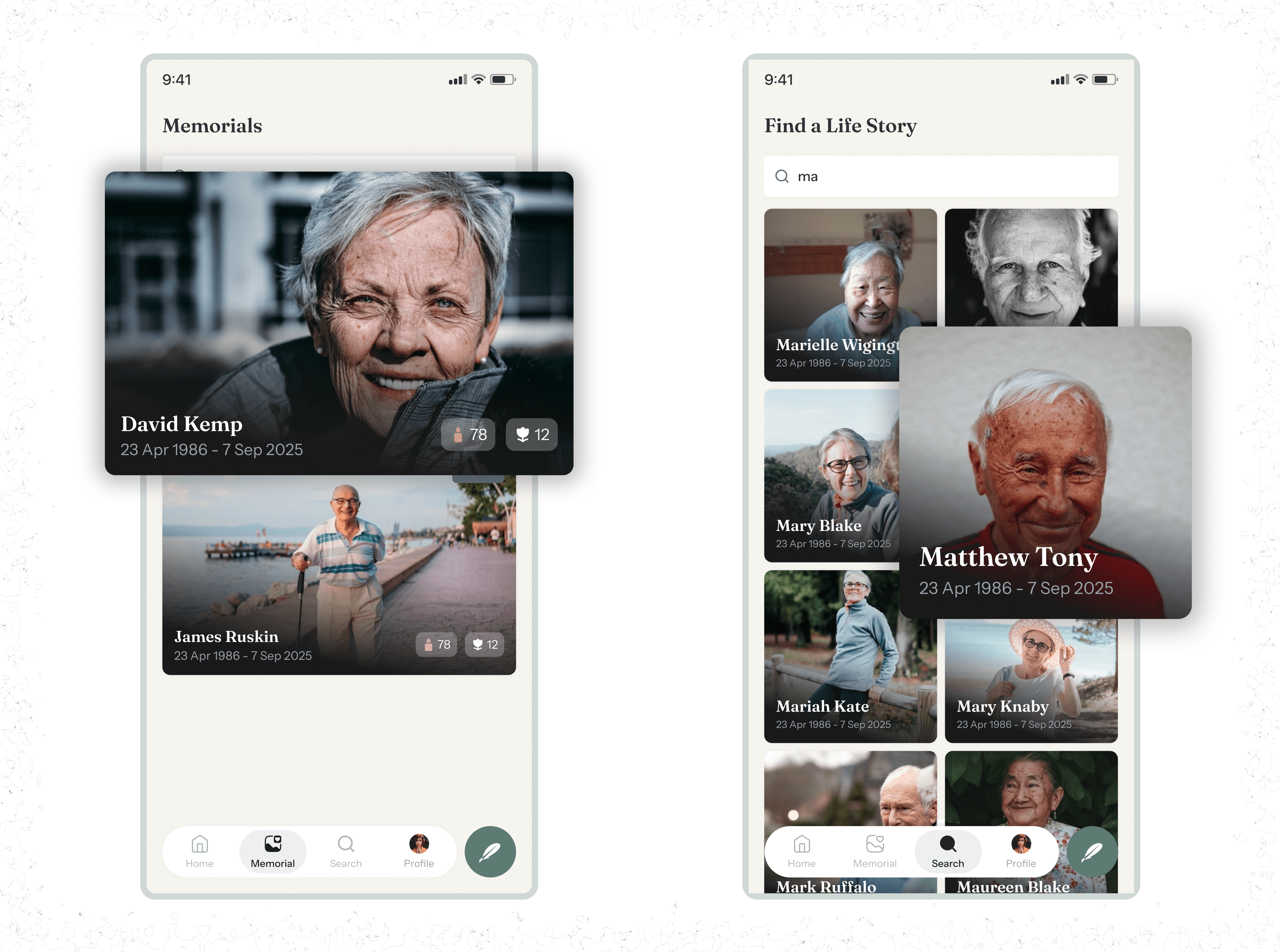
MEMORIAL CARDS
We have two variations of the memorial cards
We have two variations of the memorial cards
Memorial-Card(Created): This shows the same as the latter, with two icons to show engagements. Candles (replacing likes), Flowers(to show memory and tributes count).
Memorial Card(Search): This memorial card is used in the search page. It contains the cover photo, name, and dates.
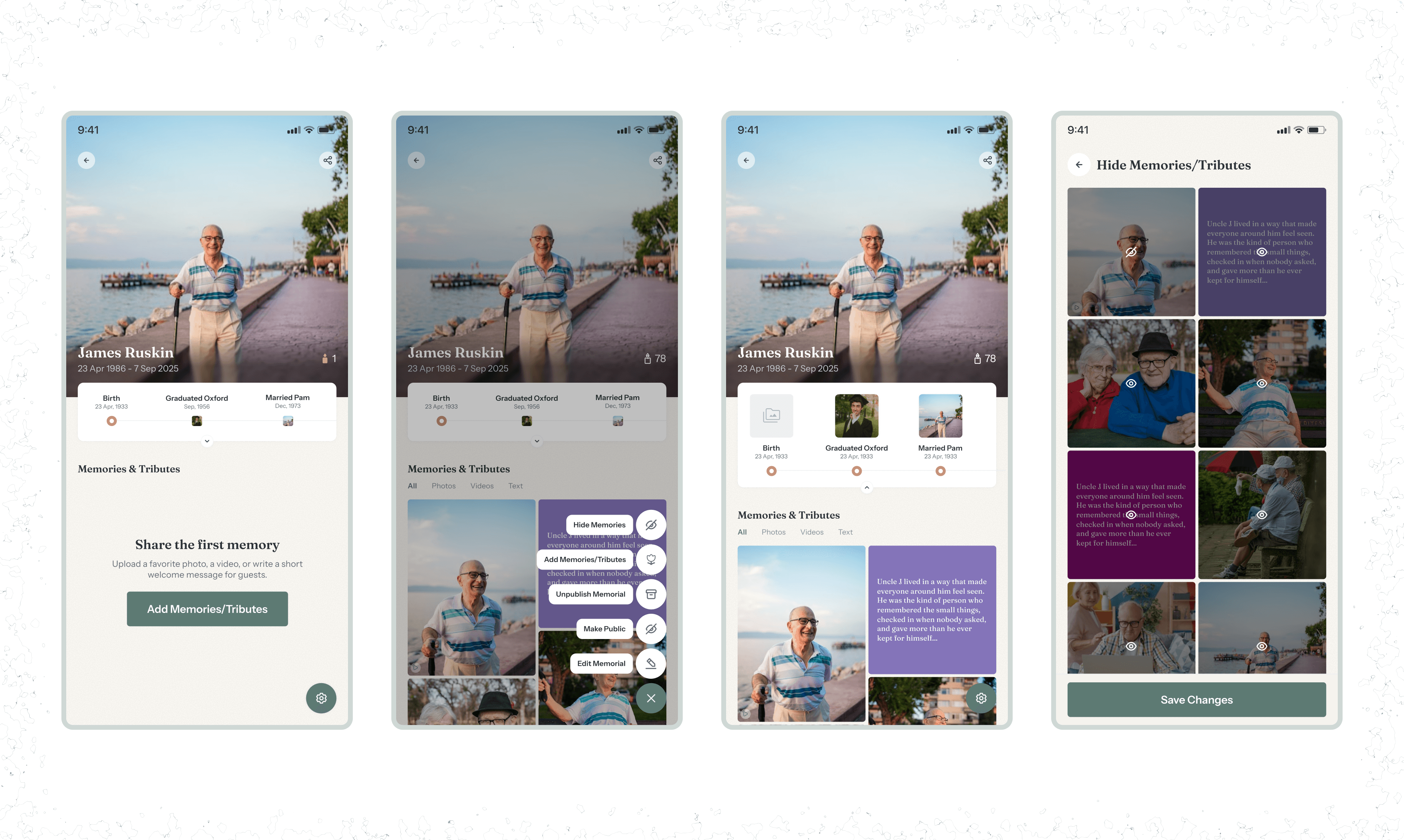
MEMORIAL PAGES (CREATOR VIEW)
After memorial creation, the creator can can go on to manage the memorial page by adding memories(more on this below), hiding published memories/tributes, editing the memorial details, and even unpublishing the memorial.
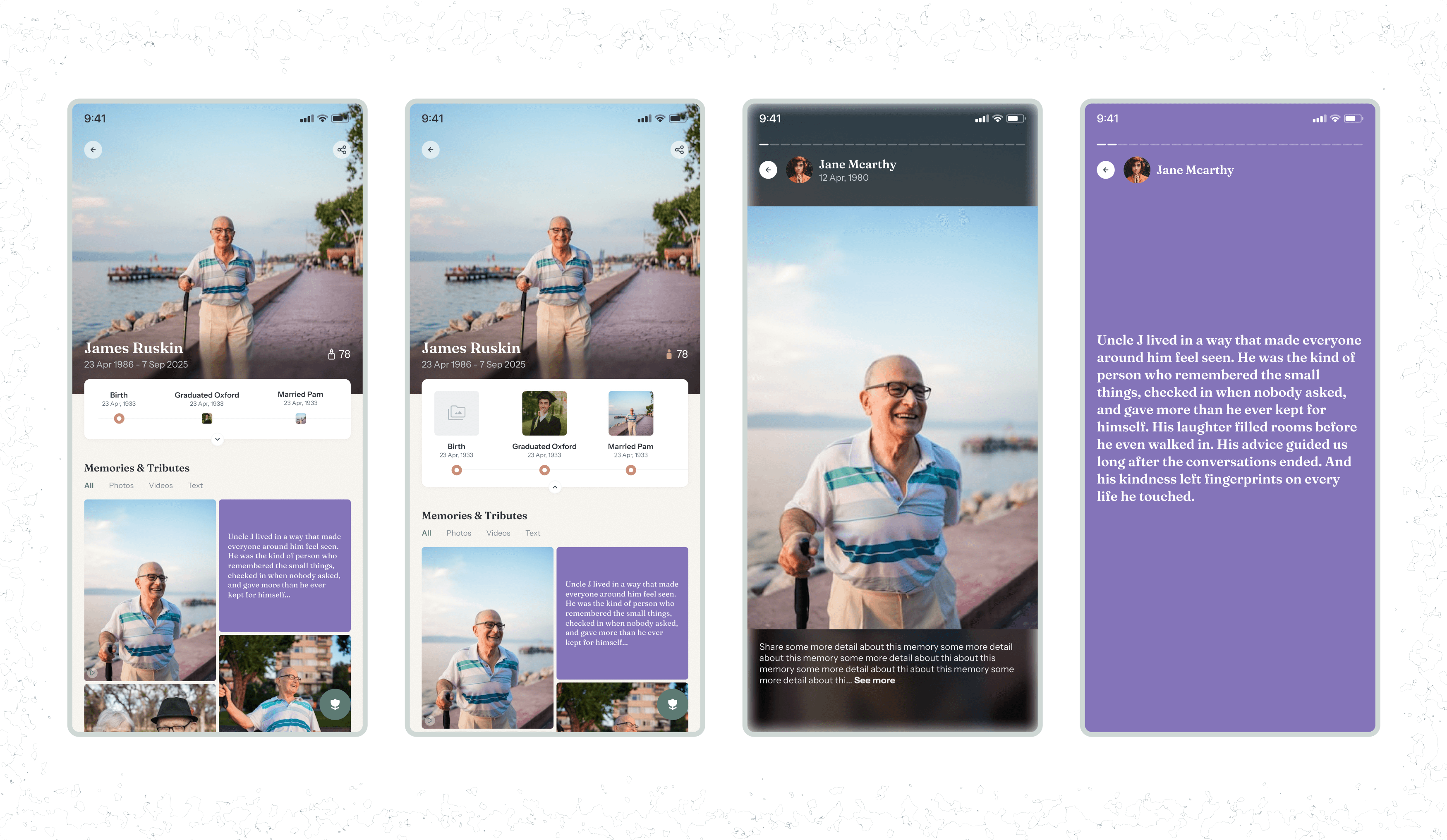
MEMORIAL PAGES (VISITOR VIEW)
THE MONUMENT:
Hero portrait, Name, Dates, and location
Interactive Timeline: Horizontal, scrollable, clean. Every memory is automatically indexed by date.
Memories & Tribute Feed (Masonry): A mix of Photos, Videos, Text tributes, Long-form stories, Guestbook messages
STORY VIEW: Swipe-able expanded slideshow view of memories tagged with the contributor, date
MICRO-INTERACTION: There is no “Like”. Instead, users light a Candle. A subtle animation makes it feel ceremonial.
ADDING A MEMORY
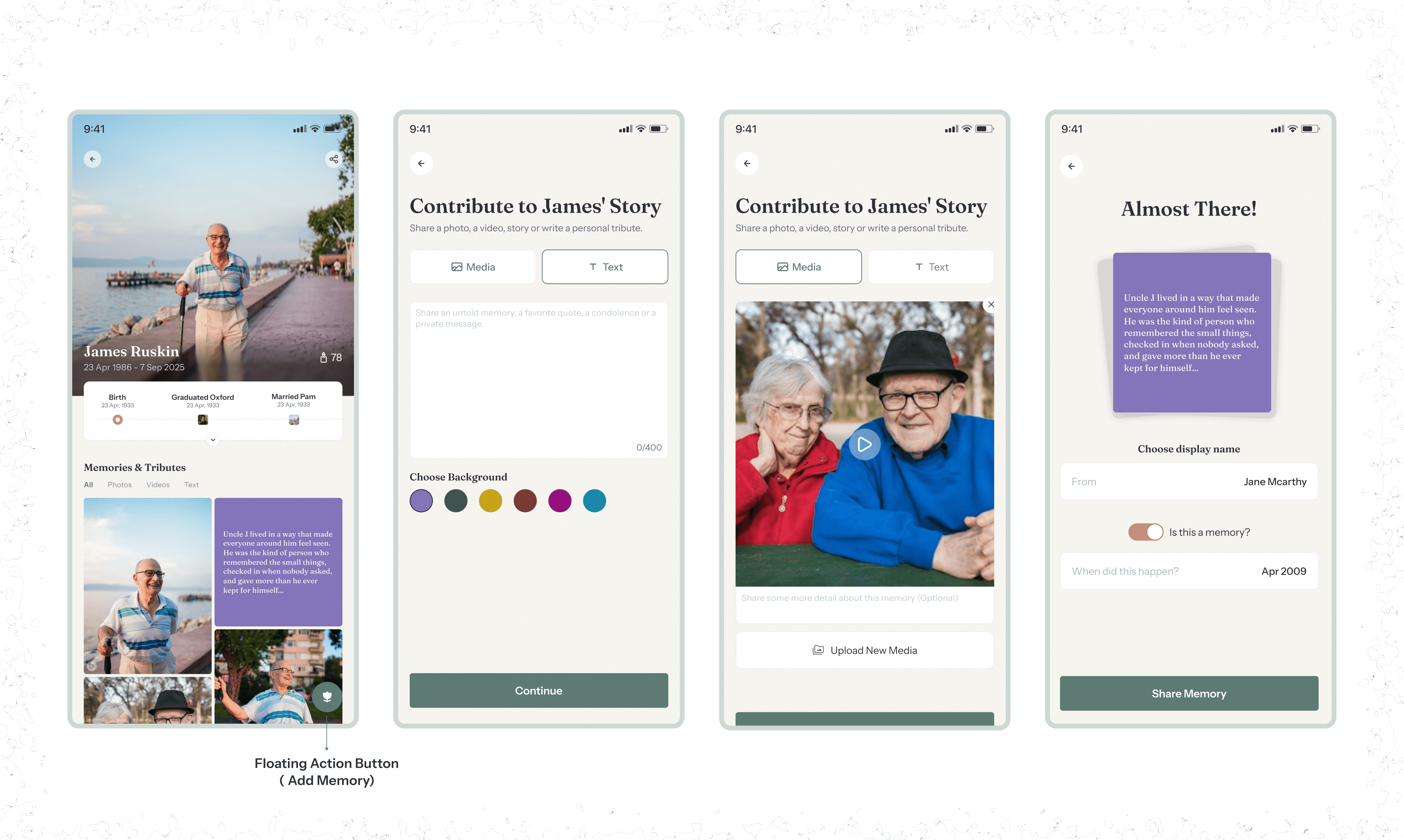
Trigger: A bottom-right floating action button - Flower Icon.
Flow: User can choose between a Visual Memory or a Written Tribute/Story, or text of any form.
Users enter:
Memory text or media
Display Name
Optional date (Month and Year only mode)
OTHER SCREENS
DESIGN PROCESS DECISION
The client wanted clarity and direction early.
We aligned on the editorial, paper-texture style upfront and focused efforts on the core flows instead of multiple design directions.
WHAT WORKED WELL (VALIDATIONS)
Client approved the first full prototype right away
Internal tests showed all flows were completed without guidance
The emotional aesthetic resonated strongly
The candles’ interaction became a signature feature
The design successfully shifted the tone from “death” to “celebrating life lived”.
WHAT I WOULD IMPROVE
If given more time:
Conduct more interviews with users who’ve experienced memorial creation.
Expand the design system with animation rules and more edge cases.
Increase accessibility adjustments specifically for emotional content.
Add collaborative story-building features (“Family Mode”)
FINAL THOUGHTS
Past Lives required empathy, intentionality, and design maturity
Not everything can be solved with UI patterns; sometimes you need to create meaning from scratch.
The balance of editorial visuals, emotional UX, simple flows, and symbolic interactions is what makes this platform feel human instead and not only just functional.
This project reminded me that design isn’t always just about usability.
Sometimes it’s about emotional resonance and honoring people’s stories.
And that is the heart of Past Lives.
Past Lives required empathy, intentionality, and design maturity
Not everything can be solved with UI patterns; sometimes you need to create meaning from scratch.
The balance of editorial visuals, emotional UX, simple flows, and symbolic interactions is what makes this platform feel human instead and not only just functional.
This project reminded me that design isn’t always just about usability.
Sometimes it’s about emotional resonance and honoring people’s stories.
And that is the heart of Past Lives.
PAST LIVES
A Memorial Experience Designed for the Living.
The Past Lives project was about building a sanctuary, a digital archive of someone’s entire existence, created by people who are grieving, remembering, healing, or celebrating a life well lived.
Year
2025
Industry
Social/Wellness
Client
Past Lives
Project Duration
2 weeks
UNDERSTANDING THE Problem
Today, memories are scattered everywhere. Old Facebook pictures. WhatsApp images. Non-digital photo books. Google Photos. Snapshots from 2016 no one can find again.
When someone passes, families have to scramble through this fragmentation, trying to build a tribute from pieces spread across the internet or in most cases - their basement.
The client wanted a solution that fixes exactly that.
THE GOAL
To create a permanent, centralized digital archive where loved ones can share memories, stories, photos, and key life moments in a peaceful, dignified environment.
THE Challenge
Existing memorial platforms often feel dark, old-fashioned, or emotionally heavy. We needed the exact opposite.
Life-first, not death-first.
TARGET USERS
Primary: The Creator
Often, the spouse, sibling, or child of the deceased.
Tech literacy level: Low to moderate.
Emotionally sensitive context requiring clarity, minimal friction, and calm visuals.
Secondary: The Mourner/Visitor
Friends and extended family who come to view the memorials
RESEARCH INSIGHTS
The short turnaround time of the project didn't allow for an extensive research process. However, I was able to interview individuals who had once lost a relative to understand how they process memories. Many described the experience this way:
“We had photos everywhere. Some on my phone, some on my siblings’ phones, some in old albums. I didn’t know how to bring them together.”
“Creating something online felt intimidating, but I wanted a place people could visit and remember.”
The following deduced insights heavily influenced the product direction:
People crave a sense of permanence but lack a structured place to store memories.
Many users rely on scattered WhatsApp groups, Google Drive folders, or old photo albums. They fear losing these memories over time and would love a single, safe, dedicated space.
Families want simplicity during emotionally heavy moments.
Users said existing memorial platforms feel “too complicated,” “too cold,” or “too much to set up.” They want something respectful, warm, and easy enough to complete in one sitting.
Photo selection and storytelling are the most emotionally meaningful parts.
People spend the most time choosing the portrait and writing the tribute. They want this moment to feel special, not rushed or transactional.
Grief makes decision-making slower, so the interface must reduce friction.
People dealing with loss said their energy and mental bandwidth were low. They didn’t want too many choices, too much text, or complex controls.
People crave a sense of permanence but lack a structured place to store memories.
Many users rely on scattered WhatsApp groups, Google Drive folders, or old photo albums. They fear losing these memories over time and would love a single, safe, dedicated space.
Families want simplicity during emotionally heavy moments.
Users said existing memorial platforms feel “too complicated,” “too cold,” or “too much to set up.” They want something respectful, warm, and easy enough to complete in one sitting.
Photo selection and storytelling are the most emotionally meaningful parts.
People spend the most time choosing the portrait and writing the tribute. They want this moment to feel special, not rushed or transactional.
Grief makes decision-making slower, so the interface must reduce friction.
People dealing with loss said their energy and mental bandwidth were low. They didn’t want too many choices, too much text, or complex controls.
People crave a sense of permanence but lack a structured place to store memories.
Many users rely on scattered WhatsApp groups, Google Drive folders, or old photo albums. They fear losing these memories over time and would love a single, safe, dedicated space.
Families want simplicity during emotionally heavy moments.
Users said existing memorial platforms feel “too complicated,” “too cold,” or “too much to set up.” They want something respectful, warm, and easy enough to complete in one sitting.
Photo selection and storytelling are the most emotionally meaningful parts.
People spend the most time choosing the portrait and writing the tribute. They want this moment to feel special, not rushed or transactional.
Grief makes decision-making slower, so the interface must reduce friction.
People dealing with loss said their energy and mental bandwidth were low. They didn’t want too many choices, too much text, or complex controls.
What these insights suggested for later design decisions
We would need to create a step-based setup that feels like a gentle guide, not a form.
The platform should reduce cognitive load with simple, safe defaults instead of too many options.
The interface would need to feel emotional and human, possibly using visual metaphors rather than cold UI patterns.
We should create a clean system that ensures memorial pages stay active, organized, and preserved long-term.
The system would likely need clear reassurance, pre-designed templates, and comforting microcopy to help users feel supported throughout the process.
Any interaction style we choose should respect the emotional state of someone grieving and avoid anything that looks too robotic, transactional, or “tech startup”.
USER FLOWS
The platform serves two journeys:
The Creator Journey
The Mourner Journey
LOW FIDELITY WIREFRAMES
VISUAL IDENTITY
SPLASH SCREENS
The splash screen introduces users to the application. After going through the screens, they are prompted to select a path. Log In, Create a Memorial, Find a Memorial.
Users can browse through memorials without having to be a signed-in user; however, to perform certain actions, they are required to sign in to the app.
LOG IN SCREEN
We have
Login Screen: Added to the login form is a changing quote block that supports users.
Home Screen: We have 3 instances of this screen
Home(Existing User): Here, existing users can see a horizontal slideshow of memorials they have created, a list of newly added memories, and their recently viewed memorials.
Home(New User): A section that prompts them to create memorials
Home(Not Logged In): A section block with a CTA to sign in to the platform.
MEMORIAL CREATION WIZARD
The goal was to make this feel like writing a biography, not filling a form.
Rationale: Step-based setup that feels like a gentle guide. Pre-designed templates and comforting microcopy to help users feel supported throughout the process.
MEMORIAL CARDS
We have two variations of the memorial cards
We have two variations of the memorial cards
Memorial-Card(Created): This shows the same as the latter, with two icons to show engagements. Candles (replacing likes), Flowers(to show memory and tributes count).
Memorial Card(Search): This memorial card is used in the search page. It contains the cover photo, name, and dates.
MEMORIAL PAGES (CREATOR VIEW)
After memorial creation, the creator can can go on to manage the memorial page by adding memories(more on this below), hiding published memories/tributes, editing the memorial details, and even unpublishing the memorial.
MEMORIAL PAGES (VISITOR VIEW)
THE MONUMENT:
Hero portrait, Name, Dates, and location
Interactive Timeline: Horizontal, scrollable, clean. Every memory is automatically indexed by date.
Memories & Tribute Feed (Masonry): A mix of Photos, Videos, Text tributes, Long-form stories, Guestbook messages
STORY VIEW: Swipe-able expanded slideshow view of memories tagged with the contributor, date
MICRO-INTERACTION: There is no “Like”. Instead, users light a Candle. A subtle animation makes it feel ceremonial.
ADDING A MEMORY
Trigger: A bottom-right floating action button - Flower Icon.
Flow: User can choose between a Visual Memory or a Written Tribute/Story, or text of any form.
Users enter:
Memory text or media
Display Name
Optional date (Month and Year only mode)
OTHER SCREENS
DESIGN PROCESS DECISION
The client wanted clarity and direction early.
We aligned on the editorial, paper-texture style upfront and focused efforts on the core flows instead of multiple design directions.
WHAT WORKED WELL (VALIDATIONS)
Client approved the first full prototype right away
Internal tests showed all flows were completed without guidance
The emotional aesthetic resonated strongly
The candles’ interaction became a signature feature
The design successfully shifted the tone from “death” to “celebrating life lived”.
WHAT I WOULD IMPROVE
If given more time:
Conduct more interviews with users who’ve experienced memorial creation.
Expand the design system with animation rules and more edge cases.
Increase accessibility adjustments specifically for emotional content.
Add collaborative story-building features (“Family Mode”)
FINAL THOUGHTS
Past Lives required empathy, intentionality, and design maturity
Not everything can be solved with UI patterns; sometimes you need to create meaning from scratch.
The balance of editorial visuals, emotional UX, simple flows, and symbolic interactions is what makes this platform feel human instead and not only just functional.
This project reminded me that design isn’t always just about usability.
Sometimes it’s about emotional resonance and honoring people’s stories.
And that is the heart of Past Lives.
Past Lives required empathy, intentionality, and design maturity
Not everything can be solved with UI patterns; sometimes you need to create meaning from scratch.
The balance of editorial visuals, emotional UX, simple flows, and symbolic interactions is what makes this platform feel human instead and not only just functional.
This project reminded me that design isn’t always just about usability.
Sometimes it’s about emotional resonance and honoring people’s stories.
And that is the heart of Past Lives.
PAST LIVES
A Memorial Experience Designed for the Living.
The Past Lives project was about building a sanctuary, a digital archive of someone’s entire existence, created by people who are grieving, remembering, healing, or celebrating a life well lived.
Year
2025
Industry
Social/Wellness
Client
Past Lives
Project Duration
2 weeks
UNDERSTANDING THE Problem
Today, memories are scattered everywhere. Old Facebook pictures. WhatsApp images. Non-digital photo books. Google Photos. Snapshots from 2016 no one can find again.
When someone passes, families have to scramble through this fragmentation, trying to build a tribute from pieces spread across the internet or in most cases - their basement.
The client wanted a solution that fixes exactly that.
THE GOAL
To create a permanent, centralized digital archive where loved ones can share memories, stories, photos, and key life moments in a peaceful, dignified environment.
THE Challenge
Existing memorial platforms often feel dark, old-fashioned, or emotionally heavy. We needed the exact opposite.
Life-first, not death-first.
TARGET USERS
Primary: The Creator
Often, the spouse, sibling, or child of the deceased.
Tech literacy level: Low to moderate.
Emotionally sensitive context requiring clarity, minimal friction, and calm visuals.
Secondary: The Mourner/Visitor
Friends and extended family who come to view the memorials
RESEARCH INSIGHTS
The short turnaround time of the project didn't allow for an extensive research process. However, I was able to interview individuals who had once lost a relative to understand how they process memories. Many described the experience this way:
“We had photos everywhere. Some on my phone, some on my siblings’ phones, some in old albums. I didn’t know how to bring them together.”
“Creating something online felt intimidating, but I wanted a place people could visit and remember.”
The following deduced insights heavily influenced the product direction:
People crave a sense of permanence but lack a structured place to store memories.
Many users rely on scattered WhatsApp groups, Google Drive folders, or old photo albums. They fear losing these memories over time and would love a single, safe, dedicated space.
Families want simplicity during emotionally heavy moments.
Users said existing memorial platforms feel “too complicated,” “too cold,” or “too much to set up.” They want something respectful, warm, and easy enough to complete in one sitting.
Photo selection and storytelling are the most emotionally meaningful parts.
People spend the most time choosing the portrait and writing the tribute. They want this moment to feel special, not rushed or transactional.
Grief makes decision-making slower, so the interface must reduce friction.
People dealing with loss said their energy and mental bandwidth were low. They didn’t want too many choices, too much text, or complex controls.
People crave a sense of permanence but lack a structured place to store memories.
Many users rely on scattered WhatsApp groups, Google Drive folders, or old photo albums. They fear losing these memories over time and would love a single, safe, dedicated space.
Families want simplicity during emotionally heavy moments.
Users said existing memorial platforms feel “too complicated,” “too cold,” or “too much to set up.” They want something respectful, warm, and easy enough to complete in one sitting.
Photo selection and storytelling are the most emotionally meaningful parts.
People spend the most time choosing the portrait and writing the tribute. They want this moment to feel special, not rushed or transactional.
Grief makes decision-making slower, so the interface must reduce friction.
People dealing with loss said their energy and mental bandwidth were low. They didn’t want too many choices, too much text, or complex controls.
People crave a sense of permanence but lack a structured place to store memories.
Many users rely on scattered WhatsApp groups, Google Drive folders, or old photo albums. They fear losing these memories over time and would love a single, safe, dedicated space.
Families want simplicity during emotionally heavy moments.
Users said existing memorial platforms feel “too complicated,” “too cold,” or “too much to set up.” They want something respectful, warm, and easy enough to complete in one sitting.
Photo selection and storytelling are the most emotionally meaningful parts.
People spend the most time choosing the portrait and writing the tribute. They want this moment to feel special, not rushed or transactional.
Grief makes decision-making slower, so the interface must reduce friction.
People dealing with loss said their energy and mental bandwidth were low. They didn’t want too many choices, too much text, or complex controls.
What these insights suggested for later design decisions
We would need to create a step-based setup that feels like a gentle guide, not a form.
The platform should reduce cognitive load with simple, safe defaults instead of too many options.
The interface would need to feel emotional and human, possibly using visual metaphors rather than cold UI patterns.
We should create a clean system that ensures memorial pages stay active, organized, and preserved long-term.
The system would likely need clear reassurance, pre-designed templates, and comforting microcopy to help users feel supported throughout the process.
Any interaction style we choose should respect the emotional state of someone grieving and avoid anything that looks too robotic, transactional, or “tech startup”.
USER FLOWS
The platform serves two journeys:
The Creator Journey
The Mourner Journey
LOW FIDELITY WIREFRAMES
VISUAL IDENTITY
SPLASH SCREENS
The splash screen introduces users to the application. After going through the screens, they are prompted to select a path. Log In, Create a Memorial, Find a Memorial.
Users can browse through memorials without having to be a signed-in user; however, to perform certain actions, they are required to sign in to the app.
LOG IN SCREEN
We have
Login Screen: Added to the login form is a changing quote block that supports users.
Home Screen: We have 3 instances of this screen
Home(Existing User): Here, existing users can see a horizontal slideshow of memorials they have created, a list of newly added memories, and their recently viewed memorials.
Home(New User): A section that prompts them to create memorials
Home(Not Logged In): A section block with a CTA to sign in to the platform.
MEMORIAL CREATION WIZARD
The goal was to make this feel like writing a biography, not filling a form.
Rationale: Step-based setup that feels like a gentle guide. Pre-designed templates and comforting microcopy to help users feel supported throughout the process.
MEMORIAL CARDS
We have two variations of the memorial cards
We have two variations of the memorial cards
Memorial-Card(Created): This shows the same as the latter, with two icons to show engagements. Candles (replacing likes), Flowers(to show memory and tributes count).
Memorial Card(Search): This memorial card is used in the search page. It contains the cover photo, name, and dates.
MEMORIAL PAGES (CREATOR VIEW)
After memorial creation, the creator can can go on to manage the memorial page by adding memories(more on this below), hiding published memories/tributes, editing the memorial details, and even unpublishing the memorial.
MEMORIAL PAGES (VISITOR VIEW)
THE MONUMENT:
Hero portrait, Name, Dates, and location
Interactive Timeline: Horizontal, scrollable, clean. Every memory is automatically indexed by date.
Memories & Tribute Feed (Masonry): A mix of Photos, Videos, Text tributes, Long-form stories, Guestbook messages
STORY VIEW: Swipe-able expanded slideshow view of memories tagged with the contributor, date
MICRO-INTERACTION: There is no “Like”. Instead, users light a Candle. A subtle animation makes it feel ceremonial.
ADDING A MEMORY
Trigger: A bottom-right floating action button - Flower Icon.
Flow: User can choose between a Visual Memory or a Written Tribute/Story, or text of any form.
Users enter:
Memory text or media
Display Name
Optional date (Month and Year only mode)
OTHER SCREENS
DESIGN PROCESS DECISION
The client wanted clarity and direction early.
We aligned on the editorial, paper-texture style upfront and focused efforts on the core flows instead of multiple design directions.
WHAT WORKED WELL (VALIDATIONS)
Client approved the first full prototype right away
Internal tests showed all flows were completed without guidance
The emotional aesthetic resonated strongly
The candles’ interaction became a signature feature
The design successfully shifted the tone from “death” to “celebrating life lived”.
WHAT I WOULD IMPROVE
If given more time:
Conduct more interviews with users who’ve experienced memorial creation.
Expand the design system with animation rules and more edge cases.
Increase accessibility adjustments specifically for emotional content.
Add collaborative story-building features (“Family Mode”)
FINAL THOUGHTS
Past Lives required empathy, intentionality, and design maturity
Not everything can be solved with UI patterns; sometimes you need to create meaning from scratch.
The balance of editorial visuals, emotional UX, simple flows, and symbolic interactions is what makes this platform feel human instead and not only just functional.
This project reminded me that design isn’t always just about usability.
Sometimes it’s about emotional resonance and honoring people’s stories.
And that is the heart of Past Lives.
Past Lives required empathy, intentionality, and design maturity
Not everything can be solved with UI patterns; sometimes you need to create meaning from scratch.
The balance of editorial visuals, emotional UX, simple flows, and symbolic interactions is what makes this platform feel human instead and not only just functional.
This project reminded me that design isn’t always just about usability.
Sometimes it’s about emotional resonance and honoring people’s stories.
And that is the heart of Past Lives.